Example: Sensor
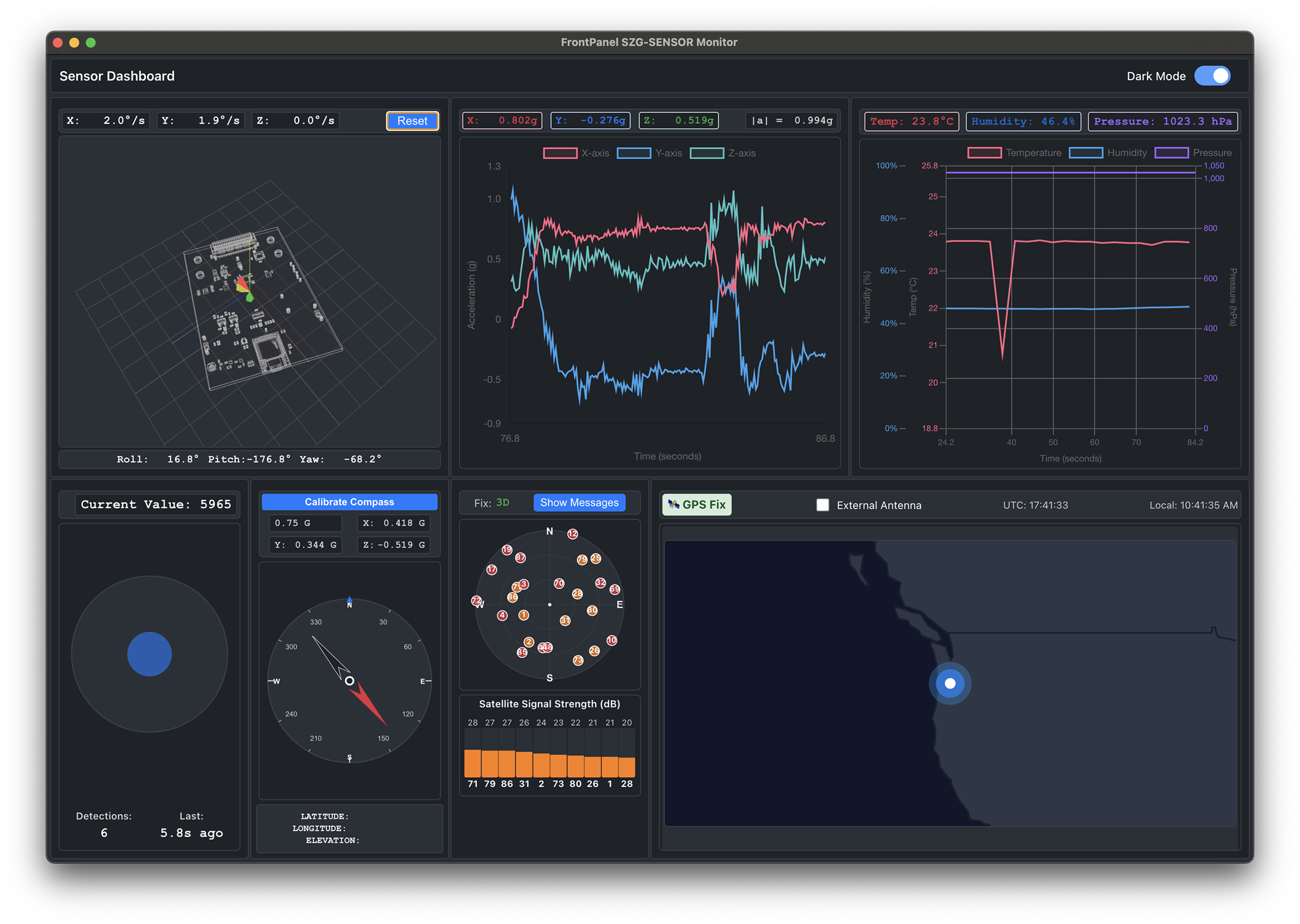
The Sensor example design features a GUI enabled by FrontPanel Platform, allowing users to monitor six sensors in real time on the SZG-SENSOR SYZYGY peripheral connected to the XEM8320. The design uses I2C, SPI, and UART communication protocols implemented in gateware to interface with a proximity sensor (SI1153), humidity and temperature sensor (HTS221), barometric pressure sensor (LPS22HB), 9-DOF IMU with accelerometer, gyroscope, and magnetometer (LSM9DS1), and a GNSS receiver (CAM-M8Q). The FrontPanel Platform software is built with React and TypeScript, utilizing Chart.js for real-time sensor graphs, Three.js for 3D gyroscope visualization, and react-simple-maps for GNSS position display, providing a comprehensive sensor monitoring dashboard that serves as a foundation for more advanced projects.
Resources
Host Boards
SYZYGY Peripherals
Links
Getting Started
You’ll need:
- XEM8320-AU25P with SZG-SENSOR on Port D
- FrontPanel Platform 6.x installed (see the FrontPanel Platform Getting Started guide)
Sensor.fppfrom the latest Sensor Example Design release
To run the example design:
- Connect the SZG-SENSOR to Port D on the XEM8320, connect the board to the PC via USB, and power on.
- Install the
Sensor.fppin the Application Launcher. - Drag the Sensor app card onto the device card.
How to Build the Software
Requirements
- Same development prerequisites as any FrontPanel Platform app (see Building with NPM Create guide)
- The latest Sensor release source
Build steps
From the Software/ folder in the release:
npm install
npm run pack
The packaged .fpp is written to Software/output/Sensor.fpp. Pre-built bitfiles ship with the repository, so you do not need to rebuild the gateware first.
How to Build the Gateware
Requirements
- Latest Sensor-App-vX.Y release Source Code (zip or tar.gz)
- Vivado Notice: Our tested version is v2024.x. Versions outside of this are not guaranteed to work.
- FrontPanel SDK 6.0.0 or higher (for FrontPanel HDL sources)
Building the Gateware
Note: A pre-built bitfile sensor_xem8320.bit is already included in the repository at software/FP-Platform/assets/bitfiles/. You only need to rebuild if you modify the gateware.
- Extract Example Design Release: Unzip/tar.gz the Example Design release and note the location for step 3.
- Open Vivado: Open the Vivado GUI and navigate to the Sensor gateware folder using the TCL Console.
- Example:
cd C:/path/to/Sensor
- Example:
- Run Setup Script: Run
source project.tclto create thesensor_sampleproject. - Add FrontPanel HDL Sources: In Vivado, go to Project Manager > Add Sources and add all files from
<FrontPanel_SDK>/FrontPanelHDL/XEM8320-AU25P/Vivado-2021/includingokCoreHarness.v,okLibrary.v, and all.xciIP core files.- Note: For newer SDK versions, the directory may be
Vivado-2024or similar.
- Note: For newer SDK versions, the directory may be
- Generate Bitstream: Click Generate Bitstream once the project is ready.
- Copy Bitfile: Copy the output bitfile from
Vivado/sensor_sample.runs/impl_1/sensor.bittosoftware/FP-Platform/assets/bitfiles/sensor_xem8320.bit.
Gateware Architecture Reference
The Sensor gateware implements three communication protocols to interface with six sensors on the SZG-SENSOR peripheral.
I2C Path
- I2C Controller: Manages I2C communication with the SI1153 proximity sensor. The controller supports a command/result memory interface with clock stretching.
- Data Flow: Proximity data from SI1153 via I2C → FrontPanel Vivado IP Core (WireOut, TriggerOut) → Host Application.
SPI Path (x4)
- 4 SPI Controllers: Four independent SPI controllers share a single clock line to interface with the environmental and motion sensors: HTS221 (humidity/temperature), LPS22HB (barometric pressure), LSM9DS1_AG (accelerometer/gyroscope), and LSM9DS1_M (magnetometer).
- Data Flow: Sensor IC data via SPI → FrontPanel Vivado IP Core (WireOut) → Host Application.
UART Path
- UART TX: Transmits commands to the CAM-M8Q GNSS receiver at 9600 baud.
- UART RX: Receives NMEA sentences from the CAM-M8Q at 9600 baud. Received bytes are buffered in a FIFO before being read by the host application.
- Data Flow (TX): Host Application → FrontPanel Vivado IP Core (WireIn, TriggerIn) → UART TX → CAM-M8Q GNSS via UART.
- Data Flow (RX): CAM-M8Q GNSS via UART → FIFO → FrontPanel Vivado IP Core (PipeOut) → Host Application.
Release Notes
Release downloads are available on GitHub at: opalkelly-opensource/Sensor Releases
Sensor Example Design 1.0.1
- Updated npm package version reference
- Added VSCode tasks
Sensor Example Design 1.0
- Gateware built with Vivado 2024.x
- Initial Release