FrontPanel SDK
Open a specific device
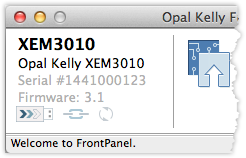
The Open() method accepts a string that contains the serial number of the target device, the last digits of which are printed on the barcode sticker of each Opal Kelly FPGA integration module. The FrontPanel Platform Application displays the full serial number when communicating with a device as shown in the screenshot to the right.
C/C++
  OpalKelly::FrontPanelDevices devices;
  auto dev = devices.Open("143400058N");Code language: PHP (php)
C#
  okCFrontPanelDevices devices = new okCFrontPanelDevices();
  okCFrontPanel dev = devices.Open("143400058N");Code language: C# (cs)
C# – Idiomatic API
using OpalKelly.FrontPanel.Api;

DeviceManager manager = new DeviceManager();

using (Device device = manager.OpenDevice("0123456789"))
{
    Console.WriteLine($"Opened {device.GetDeviceInfo().SerialNumber}");
}Code language: C# (cs)
Javascript
const dev = await window.FrontPanelAPI.deviceManager.openDevice('143400058N');Code language: TypeScript (typescript)Python
  devices = ok.FrontPanelDevices()
  dev = devices.Open("143400058N")Code language: Python (python)
Python – Pythonic API
from frontpanel import DeviceManager

manager = DeviceManager()

with manager.open_device("0123456789") as device:
    print(f"Opened {device.get_device_info().serial_number}")Code language: Python (python)
Java
  public class Example {
      okCFrontPanelDevices devices;
      okCFrontPanel dev;

      public void OpenWithSerial() {
          devices = new okCFrontPanelDevices();
          dev = devices.Open("143400058N");
      }
  }Code language: PHP (php)
JavaScript
const deviceManager = window.FrontPanelAPI.deviceManager;
const dev = await deviceManager.openDevice("143400058N");Code language: JavaScript (javascript)